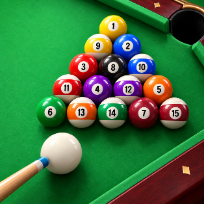

Billiards 8Sports · Two Player





How to play Billiards 8
Billiards 8 is a top-down pool table with fifteen balls and a cue ball. Aim by moving the mouse or touching the table, set the power on the bar, tap the cue ball to add top, back or side spin, and shoot. A dotted guide shows where the cue ball will touch first and where the object ball will go.
The rules follow simple eight-ball: the table is open after the break, the first ball you sink decides whether you shoot solids or stripes, and you keep shooting while you pot your own balls. A scratch, hitting the wrong ball first or a shot where nothing reaches a cushion is a foul and gives your opponent the cue ball in hand. Clear your group, then sink the black eight to win; sinking it too early loses.
Play against a bot at three levels (the hard bot tries shots on a copy of the table before it plays) or pass the screen to a friend. Rewarded videos are optional: one shows a suggested shot, another takes back your last shot. Your wins and streaks are saved on your device. No download and no account.
Controls
Move the mouse over the table to aim, drag the power bar, click SHOOT or press Space. Arrow keys fine tune.
Touch the table to aim, drag the power bar, tap the ball icon for spin, then tap SHOOT.
FAQ
How do I choose solids or stripes?
After the break the table is open. The first ball you sink without a foul decides your group.
What happens on a foul?
Your opponent gets the cue ball in hand and can place it anywhere on the table.
How do I add spin?
Drag the small ball icon next to the power bar. Up gives follow, down gives draw, sideways gives side spin on cushions.
Can I play with a friend?
Yes. Choose 2 players on the start screen and take turns on the same device.
Is Billiards 8 free?
Yes. It is free to play in your browser, with no download and no account.
Can I play on my phone?
Yes. It runs on phones, tablets and computers. Touch the table to aim, drag the power bar, tap the ball icon for spin, then tap SHOOT.