
Roll BlockPuzzle · Brain
How to play Roll Block
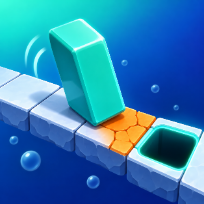
Roll Block is a tile-rolling puzzle with 20 levels. You steer a tall glossy block across a floating floor drawn in a 2.5D view. Every move tips it over onto its side or back upright, so its footprint changes with each roll. Stand it upright on the dark goal hole and do not roll off the edge.
Orange cracked tiles break if the block stands upright on them, so lay it down to cross. Round switches and heavy switches extend hidden bridges, and some levels cannot be finished without them. Fewer moves earn up to three stars: par is the shortest path found by the game itself.
A hint button shows the next three moves as arrows, and after a fall you can try again at once or take back your last move. Progress and stars are saved on your device. The game runs in the browser with no download and no account.
Controls
Arrow keys or WASD to roll. R restarts. P or Esc pauses. M mutes.
Swipe in any direction on the screen to roll the block. Buttons at the top for hint, restart, sound and pause.
FAQ
How does the block move?
Each press or swipe tips it over one edge. Upright it lands lying on two tiles, lying it can roll sideways or stand up again.
How do I win a level?
Stand the block upright on the dark goal hole. Lying across the hole does not count.
What do the orange tiles and switches do?
Orange tiles break under an upright block, so cross them lying down. Switches extend pale blue bridges; the blue X switch only reacts to the standing block.
How are stars given?
Three stars for matching the shortest solution (par), two stars up to about one and a half times par, otherwise one.
Is Roll Block free?
Yes. It is free to play in your browser, with no download and no account.
Can I play on my phone?
Yes. It runs on phones, tablets and computers. Swipe in any direction on the screen to roll the block. Buttons at the top for hint, restart, sound and pause.