





How to play Bumper Dash
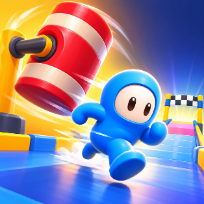
Bumper Dash is a top-down obstacle race built around one idea: you only move while you hold the run button. Let go and you stop, so waiting for a spinning bar or a swinging hammer to pass is part of the skill. Steer left and right to dodge sliding blocks, bumper posts and gaps that only a narrow bridge crosses.
The field shrinks as you progress: the first courses are four runners where only the last is eliminated, then six, then eight, with fewer places each time. Conveyor belts push you sideways, ice makes steering slippery and boost pads give a burst of speed. Fall into a gap and you restart from the last checkpoint.
Every fifth level is a timed bonus course packed with coins. Collect coins to unlock new runners and to train your speed, claim a daily reward that grows over a seven day streak, and watch an optional short video to double coins or retry. Your level, coins and best score are saved on your device.
Controls
Hold Space, W/Up or the mouse button to run; release to stop. Drag or Left/Right (A/D) to steer. P or Esc pauses, M mutes.
Hold the big RUN button (or press and hold on the track) to run, release to stop. Drag on the track or use the arrow buttons to steer.
FAQ
How do I stay in the race?
Finish ahead of the runners who are eliminated: only the last one on the first courses, then the last two, later all but the top five, four or three.
What happens when I fall into a gap?
You drop out for a second and restart from the last green checkpoint.
Why does my runner stop?
You only run while you hold the run input. Release it on purpose to wait for a hammer or bar to pass.
What is the bonus level?
Every fifth level is a solo, timed course full of coins. Coins count triple, and finishing before the timer ends adds a bonus.
Is Bumper Dash free?
Yes. It is free to play in your browser, with no download and no account.
Can I play on my phone?
Yes. It runs on phones, tablets and computers. Hold the big RUN button (or press and hold on the track) to run, release to stop. Drag on the track or use the arrow buttons to steer.